Least Privilege at Scale: How the Trust Lockdown Inheritance Tree Simplifies Zero-Trust Application Control
When Trusted-Looking Software Becomes an Attacker's Backdoor
Date: March 11, 2026
Executive Summary
- Threat: Attackers are distributing digitally signed malware that installs legitimate Remote Monitoring and Management (RMM) tools as persistent backdoors — bypassing conventional signature-based and behavioral defenses. (TechRadar, March 2026)
- Why traditional security fails: Default-allow models permit signed software to execute. Because RMM tools like ScreenConnect and MeshAgent are also legitimate admin utilities, they are frequently whitelisted — giving attackers a ready-made persistent-access toolkit hiding in plain sight.
- The fix: Least Privilege software execution — only explicitly approved software runs — combined with the Trust Lockdown Security Groups Inheritance Tree, which propagates policies automatically from a single root down to every endpoint in the organization.
- The result: Unauthorized RMM tools are blocked under approved-only execution policy, regardless of how they are signed or packaged. Zero-Trust policies defined once at the root cascade to thousands of endpoints automatically, without per-device configuration.
🚨 The Modern Threat: Signed Malware and RMM Backdoors
Microsoft recently warned of an active attack campaign in which threat actors distribute digitally signed malware that installs Remote Monitoring and Management (RMM) tools — such as ScreenConnect and MeshAgent — as persistent backdoors on victim systems. (TechRadar)
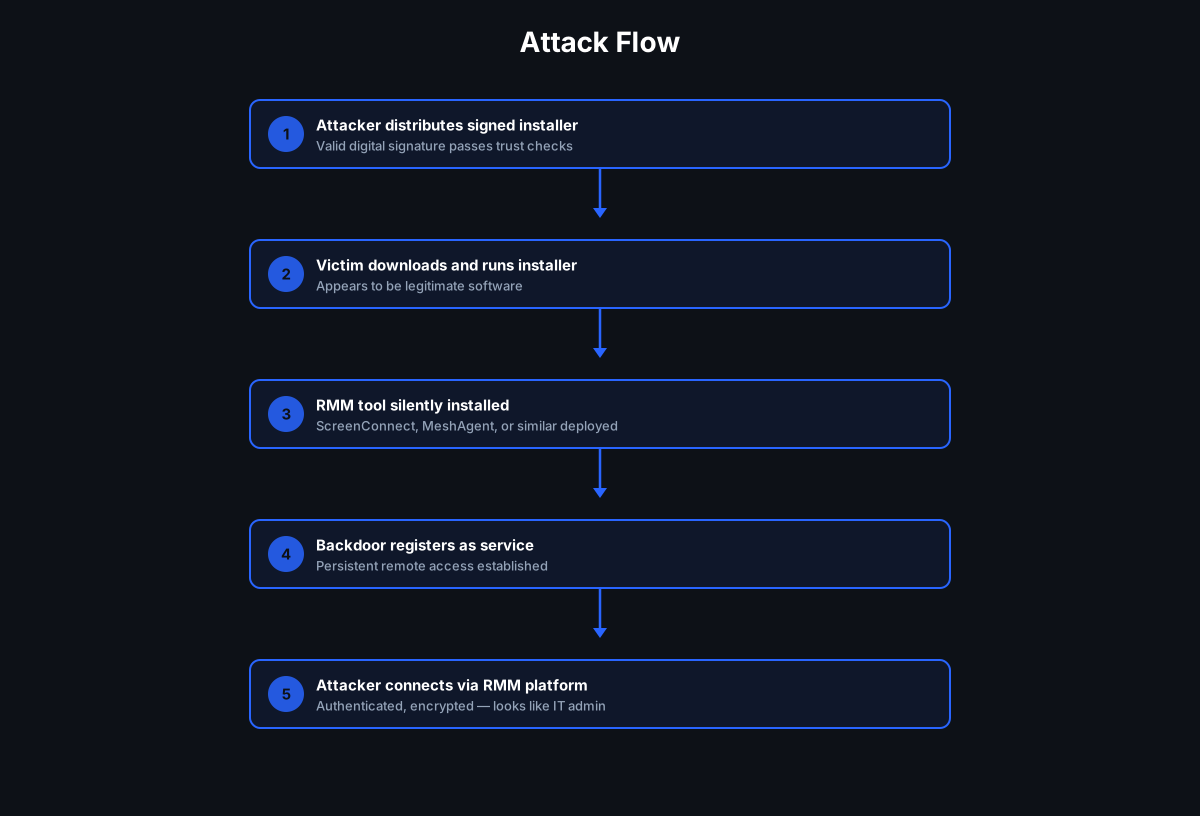
The attack chain is straightforward and effective:
- Delivery — A victim downloads or is socially engineered into running what appears to be a legitimate installer. The file bears a valid digital signature, making it appear trustworthy.
- Installation — The signed package silently deploys an RMM tool in the background.
- Persistence — The RMM tool registers itself as a legitimate remote-access service. Because RMM platforms are widely used by IT teams, many environments already permit them.
- Backdoor access — The attacker connects to the compromised system through the RMM platform's own infrastructure — authenticated, encrypted, and indistinguishable from legitimate IT remote support activity.
The result is persistent, remote attacker access that looks exactly like authorized IT administration. The attacker does not need to write a custom RAT. They simply repurpose software your own IT team might already have installed.

In a default-allow environment, this attack succeeds because:
- The installer is signed — it passes code-signing trust checks
- RMM tools are legitimate software — they may already be on allowlists
- No malicious binary is written to disk in the traditional sense — the payload is the admin tool
- EDR and AV detect threats reactively, after execution — by the time a behavioral alert fires, the backdoor is already live
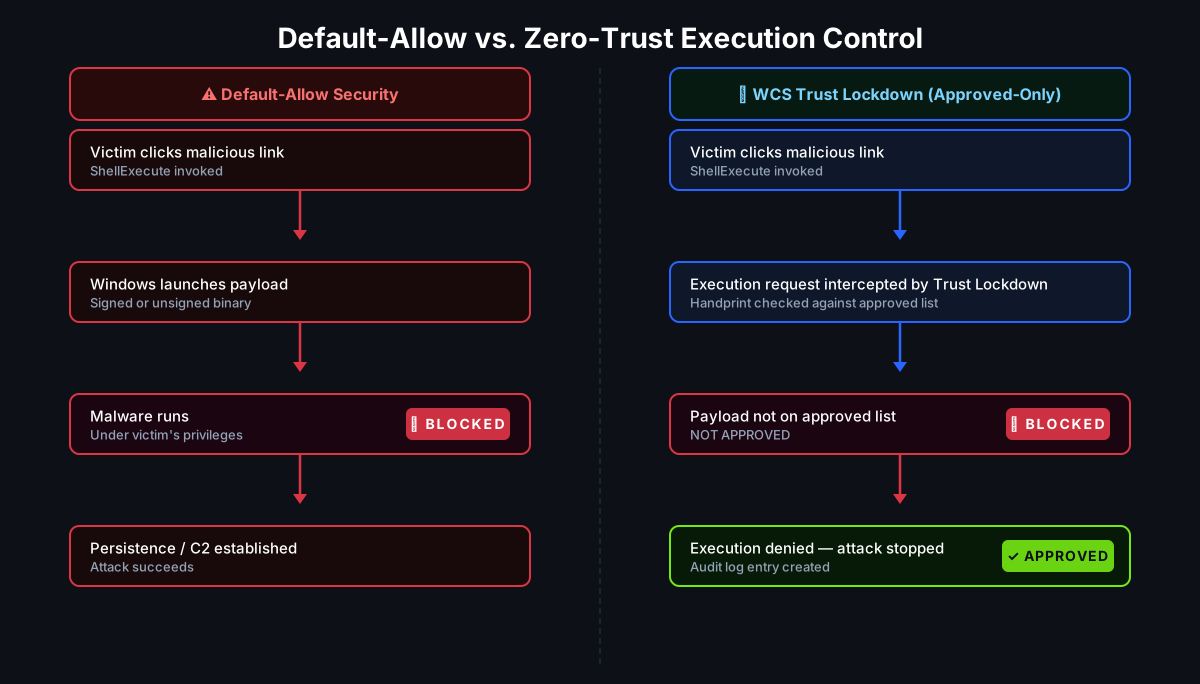
In a Zero-Trust default-deny environment, the attack is stopped at step 2 — because the RMM installer has no approved handprint in the Trust Lockdown policy. It is blocked before execution.
This diagram illustrates the fundamental difference between detection-based security and execution control. In default-allow environments, attackers only need to disguise malware as legitimate software. In a Zero-Trust execution model, unauthorized software is blocked by default before it can run.
🔒 Least Privilege Software Execution
The principle of Least Privilege is well understood in the context of user accounts: grant users only the access they need for their role. The same principle applies — with equal force — to software.
Only software required for a given role should be allowed to run. Everything else is blocked by default.
This is not theoretical caution. It is the only execution model that reliably stops:
| Threat Class | Why Least Privilege Stops It |
|---|---|
| Signed malware deploying RMM tools | The RMM installer is not on the approved list — execution denied regardless of signature |
| Ransomware | The ransomware executable has no approved handprint — it cannot run |
| Supply chain malware | A compromised package has a different handprint than the legitimate version — blocked |
| Living-off-the-land attacks | Unapproved use of LOLBins outside their approved policy scope is denied |
| Unauthorized admin tools | An attacker dropping a remote-access tool post-compromise cannot execute it |
The critical distinction between Least Privilege execution and detection-based tools is timing. Detection asks: does this look malicious? Execution control asks: has this been explicitly approved to run? The first question can be fooled by a valid signature. The second does not rely on appearance or signature — it requires explicit prior authorization.
🌲 The Trust Lockdown Security Groups Inheritance Tree
Enforcing Least Privilege across a large organization sounds administratively expensive. The Trust Lockdown Security Groups Inheritance Tree is specifically designed to make it scalable. (WCS Security Groups)
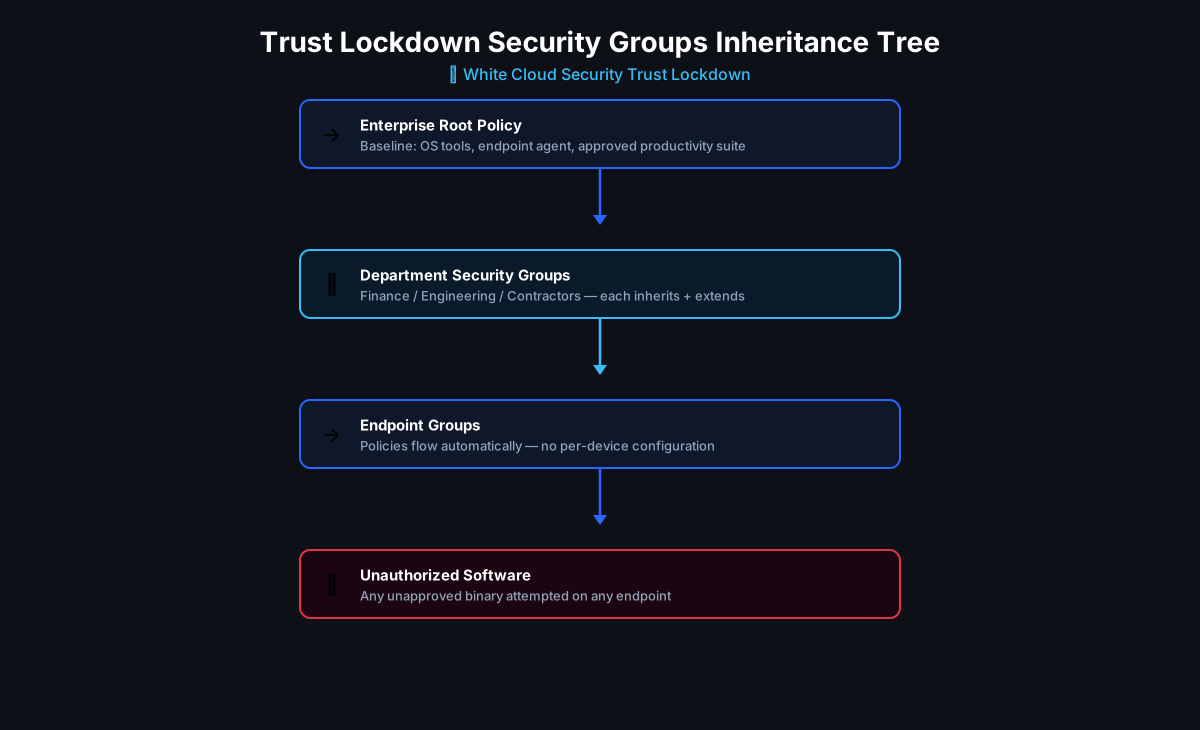
The core insight: child groups automatically inherit App Policies and Admin Access rights from their parent groups. An administrator defines a policy once at the root, and it cascades downward through the entire organizational hierarchy without per-device or per-group configuration.
How the Inheritance Tree Works
Every WCS deployment has a root Security Group. Below it, administrators create child groups that mirror the organization's structure — by department, function, geography, or endpoint type. Each child group:
- Inherits all approved software policies from its parent by default
- Can extend the inherited policy with role-specific software additions
- Can override inherited policies by disabling inheritance at any branch (creating a new independent policy root for that subtree)
This gives organizations three operations that cover every management scenario:
| Operation | When to Use | Result |
|---|---|---|
| Inherit (default) | Most endpoints — no special software needed beyond the baseline | Parent policies automatically applied, no action required |
| Extend | A department needs additional approved software | Add to the child group; parent baseline still enforced |
| Override | A business unit needs a completely independent policy | Disable inheritance at that branch; new root for that subtree |
The same inheritance model governs Admin Access — not just software policies. Administrators added to an Admin Group automatically gain management access to every Security Group that trusts that Admin Group, including all inheriting subgroups. One access grant, precisely scoped, propagates to exactly the right endpoints. (Managing Real-Time Zero-Trust Admin Access)

🏢 Example: Enterprise Policy Structure
Here is how a mid-size enterprise might structure its Trust Lockdown Inheritance Tree to enforce Least Privilege at scale:
flowchart TD
    Root["🏢 Enterprise Root Policy\n(baseline: OS tools, endpoint agent,\napproved productivity suite)"]
    Finance["💼 Finance Department\n+ accounting software\n+ financial reporting tools"]
    Engineering["⚙️ Engineering Department\n+ IDEs, compilers, build tools\n+ approved developer utilities"]
    Contractors["🔑 Contractor Systems\n+ limited approved toolset\n+ no admin tools\n+ no RMM clients"]
    Endpoints1["Finance Endpoints\ninherit Finance + Root policies"]
    Endpoints2["Engineering Endpoints\ninherit Engineering + Root policies"]
    Endpoints3["Contractor Endpoints\ninherit Contractor + Root policies"]

    Root --> Finance
    Root --> Engineering
    Root --> Contractors

    Finance --> Endpoints1
    Engineering --> Endpoints2
    Contractors --> Endpoints3
In this structure:
- The Enterprise Root Policy defines the baseline that every endpoint in the organization receives — approved OS utilities, the WCS endpoint agent, and standard productivity software. This is the single point where organization-wide security standards are enforced.
- Finance endpoints inherit the baseline and additionally permit finance-specific software (ERP, accounting tools). An RMM installer dropped by malware on a Finance workstation is not on either list — it is blocked.
- Engineering endpoints inherit the baseline and add development tooling. Engineers may legitimately use remote-access tools, but only the specifically approved ones — not an attacker-installed RMM variant with a modified handprint.
- Contractor endpoints have the most restricted policy. Contractors inherit the baseline but have no approved admin tools or RMM clients at all. Even a contractor who is social-engineered into running a signed RMM installer cannot execute it.

In traditional environments, administrators must configure security policies individually across systems, which leads to complexity and configuration drift. The Trust Lockdown Security Groups Inheritance Tree allows organizations to define baseline policies once and automatically apply them across all departments and endpoints, dramatically simplifying Zero-Trust security management.
📡 Deployment Model: From Monitoring to Enforcement
Trust Lockdown supports a gradual deployment path designed for production environments where abrupt enforcement could disrupt operations:
Monitor Mode
Endpoints are placed in Monitor Mode initially. The system observes all execution events — logging every software execution attempt against the current policy — but does not block anything. This gives administrators visibility into:
- Which software is currently running across the fleet
- Which executions would be blocked under the proposed policy
- Gaps between the expected approved list and actual installed software
Monitor Mode is the discovery phase. It lets organizations build an accurate approved list from observed reality rather than guesswork.
Block Mode
Once the approved list is validated and refined, endpoints are promoted to Block Mode. From this point:
- Only handprint-verified, policy-approved software executes
- Every unauthorized execution attempt is blocked before it runs
- Alerts are generated in real time
- Audit logs capture the event with full context
The transition from Monitor to Block is controlled at the Security Group level — which means it can be rolled out branch-by-branch through the Inheritance Tree, validating each department's policy before enforcement goes live.
👁 Real-Time Visibility and Audit Logging
When an unauthorized execution is attempted — whether ransomware, a signed RMM installer, or any other unapproved binary — Trust Lockdown:
- Blocks execution before the process starts
- Generates an alert that can be surfaced to SIEM, SOC, or admin dashboard in real time
- Logs the event with handprint, path, user, endpoint, timestamp, and policy decision
This provides something detection-based tools cannot offer: early warning that an intrusion has already been attempted, before any damage occurs. The log entry is not "malware ran and was stopped" — it is "something tried to run that was never approved." That signal is actionable before any payload executes.
In the signed-RMM-backdoor attack scenario, the audit log entry appears the moment the victim double-clicks the malicious installer. The attack is stopped at that instant. The log shows exactly what was attempted, from where, and by whom — with no endpoint cleanup required.
"At White Cloud Security, we continue to track and report new hacking methods and tools — not just because of its immediate threat, but because patterns of reuse often expose the playbooks of these cybercriminal groups."
🛡 Why Default-Deny Matters
Default-allow security assumes software is safe until proven malicious. That assumption is the foundation of every signature-based and behavioral detection system — and it is the assumption that signed-malware-deploying-RMM attacks are specifically engineered to exploit.
Zero-Trust assumes the opposite: software is untrusted until explicitly approved. The question is never "does this look bad?" It is "has this been authorized?"
This is not a subtle distinction. It is the difference between:
- A security model that an attacker can bypass by obtaining a valid code signature
- A security model that an attacker cannot bypass regardless of how the payload is packaged — because no signature, however valid, constitutes approval to run
Least Privilege software execution combined with the Trust Lockdown Security Groups Inheritance Tree makes this model operationally viable at enterprise scale:
- Define approved software once at the root
- Extend by department for role-specific needs
- Enforce automatically at every endpoint through inheritance
- Override only where a business unit has genuinely different requirements
The result is Zero-Trust application control that does not require per-device administration, does not rely on ever-expanding threat databases, and does not give attackers a window of opportunity while detection signatures catch up. Ransomware, supply chain malware, living-off-the-land attacks, and signed backdoor installers all fail the same test: they are not on the approved list.
📌 Key Takeaways
- Signed malware deploying RMM tools is an active, growing threat. Microsoft has documented this pattern; it specifically targets the gap between "trusted signature" and "authorized execution."
- Default-allow models cannot stop this. A valid code signature is not authorization. An approved RMM platform is not a blanket permit for any RMM installer.
- Least Privilege execution closes the gap. Only handprint-verified, policy-approved software runs — regardless of signature, source, or appearance.
- The Trust Lockdown Inheritance Tree makes Least Privilege scalable. Define policies once at the root; enforce them everywhere through automatic inheritance.
- Monitor Mode enables safe deployment. Organizations can observe, validate, and refine policies before enforcement — then roll out Block Mode branch by branch.
- Real-time audit logging provides early warning. The block event is the intrusion indicator — captured before any payload runs.
📚 References
- TechRadar — Microsoft Warns of New Signed Malware Which Deploys Remote Monitoring Tools as Backdoors
- White Cloud Security — Using Security Groups (Inheritance Tree)
- White Cloud Security — Managing Real-Time Zero-Trust Admin Access
Further Reading
- Managing Real-Time Zero-Trust Admin Access to an Inheritance Tree
- Beware of Tools that Hackers Repurpose for Command 'n' Control
- WCS Benefits vs. MDR / EDR Benefits
- Cybersecurity for the Agent Era