Phishing via Legitimate SaaS Support Platforms: When the Domain Looks Trusted
Attackers Are Abusing Zendesk Tenants to Send Authenticated Phishing Email — and Your Spam Filter May Not Catch It
Date: February 24, 2026 Primary Source: VirusTotal URL Report — travelassist.zendesk.com, VirusTotal IP Report — 216.198.54.1
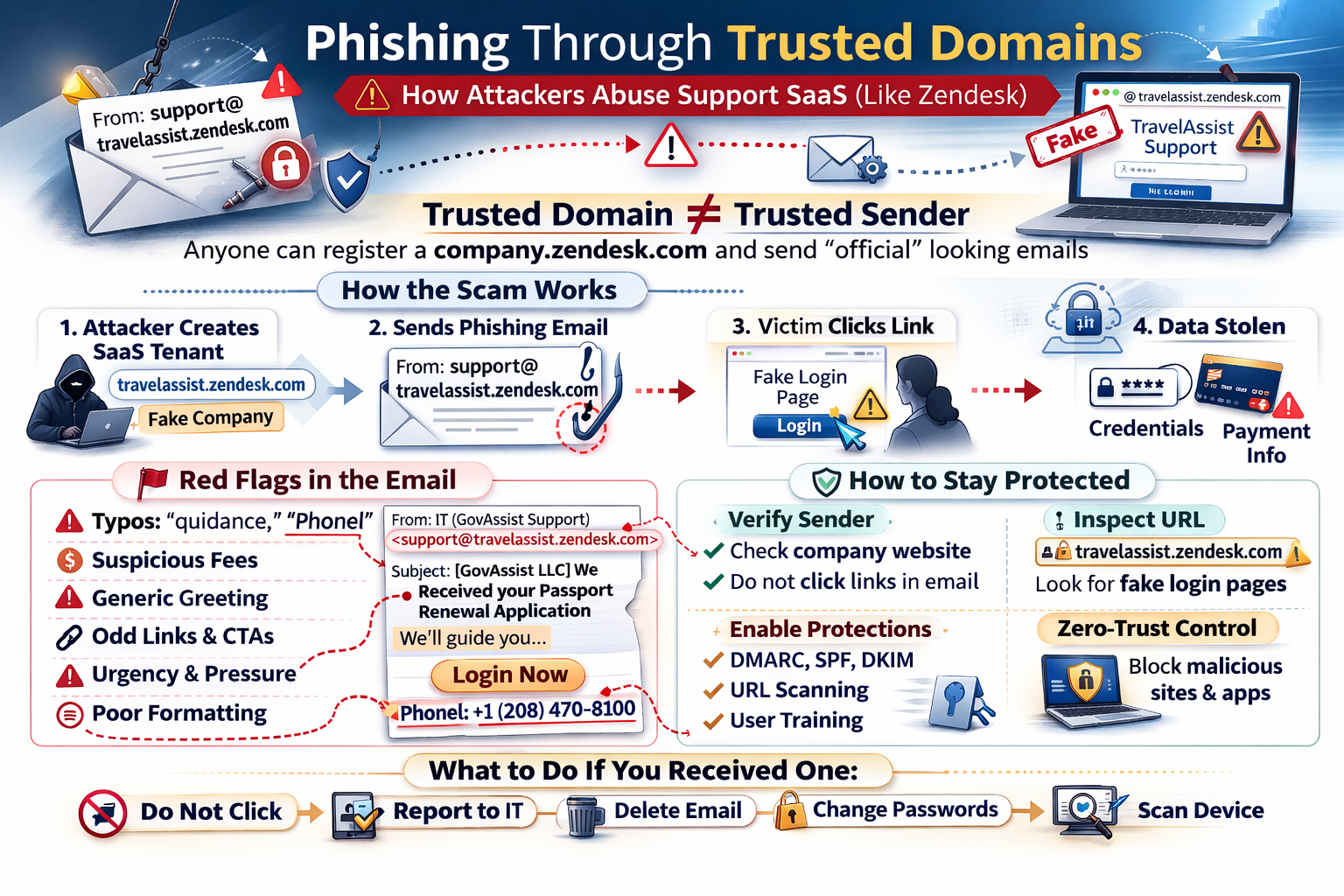
A phishing campaign impersonating a U.S. passport renewal assistance service was observed on February 22, 2026, sent from support@travelassist.zendesk.com — a Zendesk support tenant that multiple security vendors have flagged as malicious. The email is crafted to appear as a legitimate service confirmation, but contains numerous indicators consistent with phishing and financial fraud.
This advisory explains how this class of attack works, why conventional email security may fail to catch it, what red flags to look for in the real email, and what organizations and individuals should do.
🔍 Executive Summary
- What: A phishing/scam email was sent from a Zendesk-hosted support tenant (
travelassist.zendesk.com) impersonating GovAssist LLC, a U.S. passport renewal assistance service. - Who is affected: Anyone who has used — or been targeted to believe they used — a third-party passport renewal service; also relevant to any organization whose users receive SaaS-platform-originated email.
- Severity: Medium (social engineering / financial fraud). No known malware payload in this specific email; primary risks are unauthorized financial charges and credential theft via embedded links.
- Action required: Do not click links or call numbers in this email. Brief users that emails from
*.zendesk.comand similar SaaS domains can originate from malicious tenants. Review your email gateway for adequate SaaS-tenant content inspection.
🧠 Overview
Most users — and many spam filters — are conditioned to treat emails from familiar, reputable domains as more trustworthy than emails from unknown senders. Attackers have learned to exploit this heuristic by abusing legitimate SaaS platforms where anyone can create a tenant and send email through the platform's own trusted infrastructure.
Zendesk is a widely used customer-support SaaS platform. When a Zendesk tenant sends a support email, it originates from Zendesk's own mail servers and is signed with Zendesk's DKIM keys. The result: the email passes SPF, DKIM, and DMARC checks — the three primary email authentication mechanisms — not because the attacker broke anything, but because Zendesk's infrastructure is, in fact, sending the message on the attacker's behalf. The platform is working exactly as designed. The abuse is in the content and intent.
The travelassist.zendesk.com tenant was used to send a targeted phishing email on a Sunday afternoon, impersonating a passport renewal confirmation. The email attempts to convince the recipient that a passport renewal application has been received on their behalf, creates urgency through pressure language, and contains financial authorization language designed to normalize future charges.
At White Cloud Security, we continue to track and report new hacking methods and tools — not just because of its immediate threat, but because patterns of reuse often expose the playbooks of these cybercriminal groups.
🚨 Threat Summary
| Field | Detail |
|---|---|
| Incident Type | Phishing / Social Engineering via SaaS Tenant Abuse |
| Platform Abused | Zendesk (travelassist.zendesk.com) |
| Sender Address | support@travelassist.zendesk.com |
| Display Name | IT (GovAssist Support) |
| Organization Impersonated | GovAssist LLC — U.S. passport renewal assistance |
| Campaign Theme | Passport renewal confirmation / financial fraud |
| Email Auth (SPF/DKIM/DMARC) | Likely PASS — sent via Zendesk infrastructure |
| Date Observed | Sunday, February 22, 2026, 1:47 PM |
| CVE | N/A — abuse of legitimate platform; no software vulnerability |
| VirusTotal Flags | Multiple vendors — malicious/phishing (see References) |
| Primary Risk | Unauthorized charges; credential theft via embedded links |
| Patch Available | N/A — platform mitigation and user awareness required |
🔧 Technical Analysis
How the Attack Works
This attack is a variant of Living off Trusted Platforms (LOTP) — using legitimate, well-trusted SaaS infrastructure to conduct malicious activity. The attack chain:
-
Tenant registration — The attacker registers a Zendesk account and creates a support tenant at a subdomain of their choosing (e.g.,
travelassist). This requires nothing more than a valid email address and costs nothing or very little. (MITRE T1583.006: Acquire Infrastructure — Web Services) -
Identity impersonation — The tenant is configured with a display name ("IT (GovAssist Support)") and subject line ("[GovAssist LLC] We Received your Passport Renewal Application") designed to impersonate a legitimate government-adjacent passport service. (MITRE T1036: Masquerading)
-
Target acquisition — The attacker creates a support ticket for the victim using their real name and email address. These details may come from data broker records, prior breach data, or the attacker's own fraudulent website where victims may have previously submitted information seeking passport assistance. (MITRE T1598: Phishing for Information)
-
Authenticated email delivery — Zendesk's ticketing system automatically sends a "ticket created" notification to the victim. This email originates from Zendesk's own mail servers. SPF resolves correctly for
zendesk.com. DKIM is signed by Zendesk. DMARC aligns. The email reaches the inbox. (MITRE T1566.002: Phishing — Spearphishing Link) -
Social engineering and fraud — The victim receives a convincing-looking email confirming a passport renewal that they may not have initiated. The email contains a vague financial authorization clause, urgency language, and embedded links (including an obfuscated WhatsApp "Click here" link). The goal is to induce the victim to either authorize a charge, provide personal information, or click through to a credential-harvesting or malware-serving page.
Observed Infrastructure
VirusTotal reports flag both the Zendesk subdomain and its associated IP address as malicious:
- URL report: VirusTotal — travelassist.zendesk.com URL — flagged by multiple security vendors as malicious/phishing
- IP report: VirusTotal — 216.198.54.1 — the IP associated with this Zendesk tenant's sending infrastructure, flagged in connection with phishing campaigns
Important framing: Zendesk itself is not compromised. This is an abuse of Zendesk's legitimate service by an attacker who created a tenant and used it for malicious purposes. Similarly, White Cloud Security makes no definitive assertion about GovAssist LLC as a corporate entity. The email campaign is consistent with phishing/scam indicators and the associated infrastructure has been reported as malicious. Recipients who have an existing relationship with GovAssist should contact the company through independently verified channels — not through any contact information in this email.
🔴 Red Flags in the Real Email
The following email was sent on February 22, 2026. A legitimate U.S. passport renewal service operating from a registered Washington D.C. address would not produce this correspondence. Below is the email text with annotations for each red flag.
From: IT (GovAssist Support) <support@travelassist.zendesk.com>
Sent: Sunday, February 22, 2026, 1:47 PM
To: <victim email address redacted>
Subject: [GovAssist LLC] We Received your Passport Renewal Application
Hello
<victim>,Thank you for choosing our Passport Renewal Assistance Service (DS-82). We're here to be your guide through this journey!
We've received your information and will be working on completing your renewal with the U.S. Department of State as quickly as possible. Once that's done, we'll be here to walk you through the next steps.
We've created this ticket for you so we can keep you updated and provide any quidance you need along the way. Just reply to this email whenever you need assistance, and we'll be right on it!*
*Please note: Our service doesn't include the government mandatory fee if not opted upon purchase. By paying, you authorize us to charge your card for the mentioned fee.
To keep everything error-free, we might reach out for a quick confirmation. Processing delays can happen, so please keep your phone close.
Remember: Once your application is submitted to the U.S Department of State, you won't be able to use your old passport until the new one arrives.
Finally, let us know how you prefer to be contacted: - Email and text - Phone call - Video call
You can contact us at: Phonel: +1 (208) 470-8100 Online (@: https://govassist.com/contact • WhatsApp © : Click here to message us
Kind regards, Global Support GOvAssist LLC Team, 1629 K St., Suite 300, Washington, D.C. 20006, United States
Please note: This automatic message has been sent to
<victim name redacted>, along with any additional Passport Renewal applications you have submitted on behalf of others.白
Spelling and Grammar Errors
- "quidance" — A misspelling of "guidance." A company managing U.S. Department of State paperwork on behalf of paying clients would not distribute unproofread correspondence.
- "Phonel:" — A clear typo for "Phone:". Suggests hastily assembled templates, automated translation, or non-native authorship.
- "U.S Department of State" — Missing the period after "U.S." — a small but consistent error in fraudulent government-adjacent communications.
- Subject line fragmentation — "We Received your Passport / Renewal Application" is split across two lines, suggesting the subject was composed in a system that does not render email subjects as a single line.
Suspicious and Inconsistent Formatting
- "Online (@:" — Garbled formatting that no professional automated system would produce. A legitimate company writes "Website:" or "Online:" followed by a clean URL.
- "• WhatsApp © :" — Unusual symbol usage and spacing inconsistent with professional communications. The copyright symbol next to WhatsApp's name and the bullet-colon combination suggest copy-paste template assembly from a non-standard source.
- "白" — A standalone Chinese character (meaning "white" or "blank") appears at the very end of the email, after the signature. This is a significant anomaly. It is likely a rendering artifact from a non-English template system or a copy-paste error from a foreign-language original. There is no legitimate reason for this character to appear in correspondence from a U.S. passport service addressed to an English-speaking audience.
Pressure and Alarm Language
- "please keep your phone close" — Urgency and proximity pressure are hallmarks of social engineering scripts. Legitimate government-adjacent service providers do not instruct customers to keep their phones physically nearby.
- "government mandatory fee if not opted upon purchase" — Deliberately vague and financially alarming. This implies an undisclosed fee may be charged to a card already on file. Legitimate services disclose all fees clearly at the point of purchase; they do not issue mid-process warnings about surprise government charges.
- "By paying, you authorize us to charge your card for the mentioned fee" — The "mentioned fee" is never defined anywhere in the email. This language is designed to create implicit consent for future unauthorized charges.
Identity and Branding Inconsistencies
- "GOvAssist LLC" — Inconsistent capitalization (
GOvinstead ofGov) in the legal company name. The body of the email uses "GovAssist" throughout, but the signature block uses "GOvAssist." A real company does not misspell its own registered name. - "IT (GovAssist Support)" — A passport renewal assistance service's customer-facing ticket confirmation email should not identify its sender as the "IT" department.
- "Global Support" — The signature closes with a completely generic name rather than a company-specific team identifier. This is characteristic of mass-produced phishing templates reused across multiple impersonation campaigns.
Ambiguous Call-to-Action
- "Click here to message us" — An unanchored call-to-action with no visible URL. In the original HTML email, this likely resolves to a WhatsApp deep link or an intermediate redirect URL. "Click here" is a known phishing CTA pattern because it deliberately conceals the actual link destination from the reader.
⚠️ Why Traditional Defenses Struggle
This attack class is specifically designed to defeat the controls most organizations rely on:
- SPF, DKIM, and DMARC — All three checks will likely pass. The email is sent through Zendesk's own mail infrastructure. These authentication mechanisms verify that the sending mail server is authorized to send on behalf of
zendesk.com— not that the Zendesk tenant is legitimate. A DMARC PASS on a SaaS-originated email means Zendesk sent it, nothing more. - Domain reputation filters —
zendesk.comhas an excellent domain reputation. Blocking all ofzendesk.comwould also block legitimate vendor support emails from real Zendesk customers throughout your organization. - Signature-based spam detection — The email contains no malware attachment, no known phishing payload URL (the WhatsApp link may be a legitimate WhatsApp URL), and no obvious payload indicator for signature matching. Its content looks like a support ticket notification.
- Display name spoofing detection — The from-name ("IT (GovAssist Support)") and from-domain (
travelassist.zendesk.com) are internally consistent. There is no from-name/domain mismatch to flag.
🔐 How to Prevent This Kind of Phishing?
The root problem is that conventional domain-reputation controls cannot distinguish a malicious Zendesk tenant from a legitimate one. The solution is to shift from blocking known-bad to permitting only known-good — the same Zero-Trust positive-control philosophy that makes default-deny application control effective at the endpoint.
Zero-Trust Domain Name Control
A Zero-Trust DNS — also called an Approved-Domain Allowlist or Zero-Trust Domain Firewall — inverts the usual DNS filtering model:
- Traditional blocklist approach: Block known-bad domains. Everything else is permitted by default.
- Zero-Trust allowlist approach: Only permit connections to explicitly approved domains. Every other domain — including attacker-registered Zendesk tenants, fresh phishing infrastructure, or unfamiliar SaaS subdomains — is denied by default.
Under a Zero-Trust DNS policy, when a user clicks the "Click here" link in a phishing email from travelassist.zendesk.com, the DNS resolution for the destination URL fails — not because that URL is on a blocklist, but because it has never been approved. The payload site, credential-harvesting page, or WhatsApp redirect never loads.
This control is particularly effective against SaaS-tenant phishing because:
- The sending platform (
zendesk.com) may be approved for known vendor support email - But the embedded link destination — an attacker-controlled redirect, a cloned login page, or a fake document download — will not be on the approved list
- The connection is denied before the browser ever renders the page
Zero-Trust Email Tenant Verification
Rather than trusting all of *.zendesk.com, a Zero-Trust email gateway only accepts email from specifically approved Zendesk tenant subdomains (e.g., your-approved-vendor.zendesk.com) — not from any arbitrary subdomain the platform allows.
When a new, never-before-seen subdomain appears — like travelassist.zendesk.com — the email is quarantined for administrator review rather than delivered. Trust is explicit and positive, not assumed from the parent platform's reputation.
Zero-Trust Egress Control
A Zero-Trust web proxy or egress firewall applies the same approved-list model to all outbound web connections:
- Users can only reach approved destinations
- Uncategorized, newly registered, or unapproved domains are blocked by default — regardless of how convincing the landing page would appear
- The phishing page, credential-harvesting site, and any payload download URL are all denied at the network layer
The Layered Zero-Trust Model
Combining these controls creates defense in depth where each layer independently stops a different stage of the attack:
| Attack Stage | Zero-Trust Control That Stops It |
|---|---|
| Phishing email from unknown Zendesk tenant | Zero-Trust email tenant allowlist — quarantine email from unapproved *.zendesk.com subdomains |
| User clicks embedded phishing link | Zero-Trust DNS — destination not on approved list; resolution denied |
| Browser attempts to load phishing page | Zero-Trust egress proxy — outbound connection to unapproved domain blocked |
| Phishing page serves a payload | Zero-Trust application control — downloaded file not in approved handprint list; execution denied |
No single layer is foolproof in isolation, but each is a hard stop for a different stage of the kill chain.
🛡 How White Cloud Security Trust Lockdown Helps
Where Application Control Fits
This campaign is primarily a social engineering and financial fraud operation. The email itself does not directly execute code on the recipient's machine. WCS Trust Lockdown operates at the application execution layer — it prevents unauthorized programs from running on endpoints. It does not filter email or prevent users from visiting web pages.
That said, phishing campaigns frequently use social engineering as the first step in a kill chain that ends with payload delivery and execution. When a victim clicks an embedded link in a phishing email:
- They may be taken to a credential-harvesting page (a web-based risk — Trust Lockdown does not address this directly)
- They may be prompted to download a "required document," "update," or "form" — an executable payload
It is at this second step — payload execution — that WCS Trust Lockdown applies:
| Phishing Stage | What Happens Without WCS | What Happens With WCS |
|---|---|---|
| Phishing email delivered | Arrives in inbox; may appear legitimate | Same — email delivery is not in WCS scope |
| User clicks embedded link | Browser navigates to attacker's page | Same — web browsing is not blocked by application control |
| Page serves a payload (e.g., a "passport form" installer) | File is downloaded to endpoint | File is downloaded — but not yet executed |
| Victim double-clicks the downloaded file | Payload executes; malware installs | Blocked — the downloaded file has no approved handprint in the Trust Lockdown allowlist. Execution is denied before the payload can do anything. |
| Malware establishes persistence or C2 | Attacker gains foothold | Never reached — blocked at execution |
Handprint Identity Verification
WCS does not try to recognize malware by pattern-matching. It verifies file identity: every executable component (EXE, DLL, script) is identified by its handprint — a composite of multiple cryptographic hashes plus byte length. A fraudulent "passport renewal form" installer that a victim downloads from a phishing page will have a handprint that does not exist in the organization's trust list. It cannot run.
This is the fundamental difference from detection-based tools: WCS does not ask "does this look malicious?" It asks "has this exact file been explicitly approved to run?" A file delivered via a phishing link — regardless of how convincing the page that served it appeared — has never been approved. It is blocked.
WCS Trust Lockdown as the Last Layer
As shown in the Zero-Trust layered model above, WCS Trust Lockdown is the final hard stop in the kill chain — the control that prevents execution even if every upstream layer (DNS, egress proxy, email gateway) is absent or bypassed. Because it operates on positive identity verification rather than threat detection, it does not need to know anything about the phishing campaign, the Zendesk tenant, or the payload URL. The only question it asks is: has this exact file been explicitly approved to run? A payload delivered via a phishing link never has been.
✅ Recommended Mitigations
For End Users
- Do not click any links in this email, including the "Click here to message us" WhatsApp link or any govassist.com URLs contained within the email itself
- Do not call the listed phone number (+1 (208) 470-8100) without first independently verifying it via an official source you navigate to yourself
- Do not authorize any charges — if you have a card on file with any passport service, review recent statements and dispute any unexpected charges immediately
- If you did not submit a passport application, this email is almost certainly fraudulent — disregard it and report it as phishing to your email provider
- If you did use a third-party passport service, contact that service through a verified number or website address you look up independently — not via any contact information in this email
- Report the email to the FTC at reportfraud.ftc.gov and to your email provider's abuse team
- Report the Zendesk tenant to Zendesk's trust and safety team so the tenant can be investigated
For IT Administrators
- Search mail gateway logs for email originating from
*@travelassist.zendesk.comand any other*.zendesk.comsubdomains not associated with an approved vendor relationship - Quarantine any delivered copies of this email organization-wide via your mail admin console (M365, Google Workspace, etc.)
- Check proxy and DNS logs for any connections to
216.198.54.1or to URLs embedded in the email, originating from affected users' workstations - Enable URL rewriting and sandbox detonation for all inbound email links — this is the most effective technical control against SaaS-tenant phishing because it evaluates the link destination at click time, regardless of the sending domain's reputation
- Consider adding content analysis rules to flag Zendesk-originated email that contains urgency language, financial authorization text, or "click here" CTAs
- Brief users that emails from
@zendesk.com,@salesforce.com,@servicenow.com, and similar SaaS platforms are not inherently trustworthy — the tenant behind the subdomain controls the content
Indicators of Compromise
| Indicator | Type | Context |
|---|---|---|
travelassist.zendesk.com |
Domain | Phishing Zendesk tenant subdomain |
support@travelassist.zendesk.com |
Sending address of phishing campaign | |
216.198.54.1 |
IP | Associated sending/tenant infrastructure — flagged malicious |
+1 (208) 470-8100 |
Phone | Listed contact number in phishing email — do not call |
Incident Response Steps (If Users Interacted)
- Preserve — Export the email with full headers before any remediation
- Scope — Identify all recipients within the organization via mail gateway logs
- Contain — Quarantine delivered copies organization-wide
- Analyze — Submit email headers, embedded URLs, and any downloaded files to your threat intelligence platform and VirusTotal
- Notify — Alert any users who clicked links, replied, or called the listed number; assess credential exposure and card fraud risk
- Report — File an abuse report with Zendesk; if financial fraud is suspected, contact your financial institution and relevant law enforcement
- Improve — Document the gap (SaaS-tenant email not subject to same scrutiny as unknown-domain email) and adjust gateway content inspection policies
💡 Key Takeaways
- Authenticated ≠ Trustworthy. An email that passes SPF, DKIM, and DMARC only proves the SaaS platform sent it — not that the tenant behind it is legitimate. Zendesk, Salesforce, and every other major SaaS platform can be abused by anyone who creates a tenant.
- The abuse is in the tenant, not the platform. Zendesk is not compromised. The attacker simply created a Zendesk tenant and used it as intended — except the intent was fraud.
- Content analysis and URL sandboxing are essential controls. Because domain reputation is useless here, inspection must shift to the content of the email and the destinations of its links.
- Users need updated mental models. "If the domain looks real, the email is probably fine" is an outdated heuristic. Security awareness training must specifically address SaaS-tenant phishing.
- WCS Trust Lockdown closes the last mile. If a user does click through and a payload is delivered, default-deny application execution prevents that payload from running — breaking the kill chain before any damage occurs.